If you just purchased hosting and want to connect your domain, you’ll need to add it inside cPanel before installing WordPress or creating a website. In this guide, I’ll show you exactly how to add a domain to your cPanel account and make sure it points to your hosting properly.
Login to your cPanel hosting account and scroll to the section labeled “Domains”. It should look something like this:
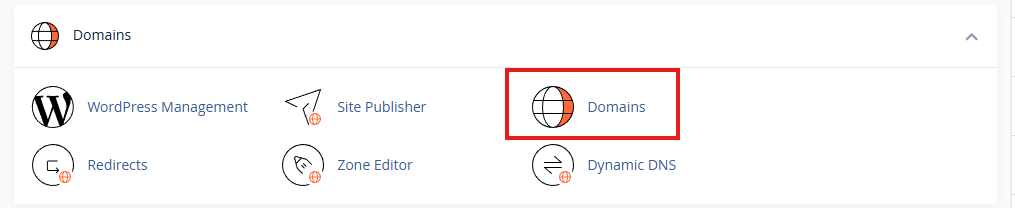
Click “Domains”.
Next step is to click “Create a New Domain” and enter your domain in the box. Before you click “Submit”, you can check the “share document root” box if you want a new domain to display the exact same website as your primary domain. You should uncheck it when you want the new domain to have its own separate website with its own files, which is the standard for addon domains and most subdomains.
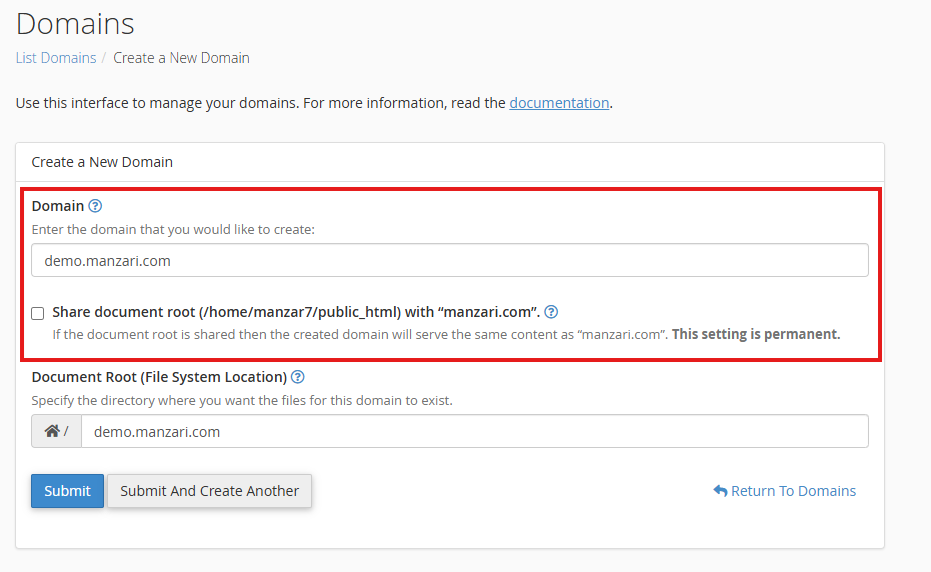
Click “Submit”, then return to your cPanel and secure your domain with SSL. You don’t need to buy an SSL — the AutoSSL option (usually powered by Let’s Encrypt) is 100% free, automatically renews, and provides the same level of encryption as paid SSL certificates.
AutoSSL is fully sufficient for blogs, business websites, and even ecommerce sites like WooCommerce, because payment gateways such as Stripe and PayPal securely handle the transaction process on their end.
You only need to purchase a paid SSL if you want extra features such as a warranty, brand-name validation, or a special certificate type (like a wildcard or EV certificate). These are optional and not required for secure payments, as long as your payment method uses modern, tokenized gateways (like Stripe, PayPal, or Authorize.net Accept.js) where your server never touches the raw card number.
However, if customers are entering their full credit card number directly on your website using a non-tokenized checkout method—where the card data passes through your server even for a moment—then a basic AutoSSL certificate is not enough. This places your site into full PCI DSS compliance scope, which requires stronger validation, strict server hardening, and additional security measures.
Read more about PCI compliance and why it matters before accepting credit cards directly on your site.