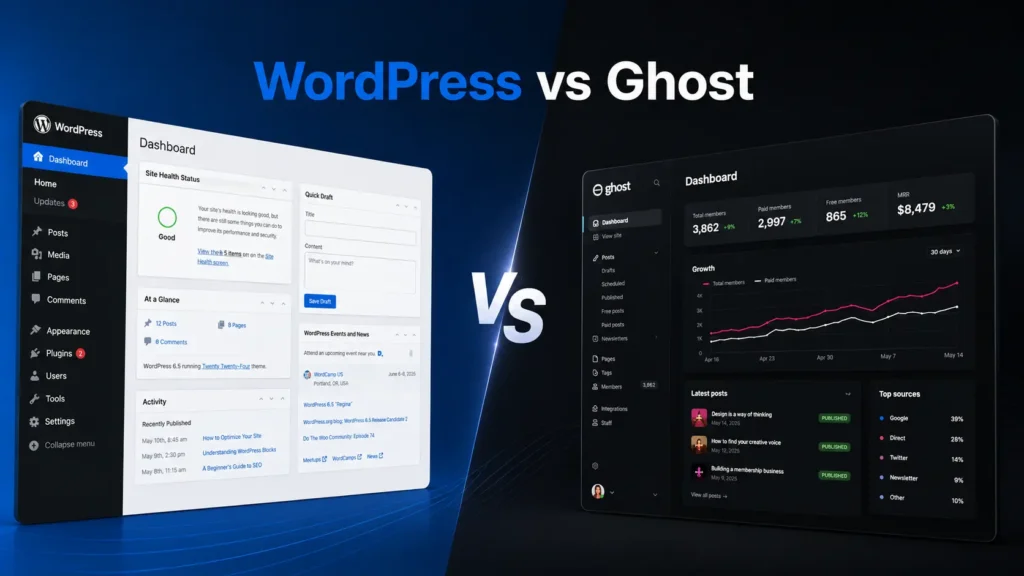
Understanding What You’re Actually Comparing
WordPress and Ghost get compared constantly, but they’re not really competing for the same job. It’s a bit like comparing a full workshop to a specialized tool—both help you build things, but they approach the work differently.
WordPress started as a blogging platform in 2003 and evolved into a complete website builder that now powers over 40% of the web. It handles everything from simple blogs to complex e-commerce sites, membership platforms, and business websites. Ghost launched in 2013 specifically as a modern publishing platform focused exclusively on content creators, writers, and publishers who want a streamlined writing and membership experience.
The distinction matters because choosing between them isn’t about which one is objectively better. It’s about which tool matches your technical comfort level, your actual goals, and how you want to spend your time managing your site.
The Technical Architecture Difference
From a technical standpoint, these platforms are built differently at their core, and that affects everything downstream.
WordPress runs on PHP and MySQL, which means it works on nearly any shared hosting environment. You install it, upload themes and plugins, and customize it through an admin interface. The system is modular—almost everything can be extended, replaced, or modified. This flexibility is WordPress’s greatest strength and sometimes its biggest complication.
Ghost runs on Node.js and uses a different database structure. It’s designed as a headless CMS, meaning the backend content management is separated from the frontend presentation. Ghost focuses on a specific workflow: write, publish, build an audience, and monetize through memberships. The platform doesn’t try to be everything to everyone.
Think of WordPress like a modular kitchen where you can swap out appliances, change the layout, and add new equipment whenever you want. Ghost is more like a professional espresso machine—it does one thing extremely well, but you can’t turn it into a full kitchen.
Installation and Setup Experience
Getting WordPress running is straightforward on most hosting platforms. Many hosts offer one-click WordPress installation, and you can have a functioning site within minutes. You’ll need to choose a theme, install some essential plugins, and configure basic settings, but the process is well-documented and supported across thousands of tutorials.
The challenge with WordPress isn’t the installation—it’s the decisions that come after. You’ll need to choose between thousands of themes, figure out which plugins you actually need, and set up your preferred workflow. This flexibility means you can build exactly what you want, but it also means you can spend hours comparing options and configuring settings.
Ghost installation is more technical if you’re self-hosting. You’ll need a server environment that supports Node.js, and the setup process requires some command-line familiarity. Ghost offers managed hosting through Ghost(Pro), which simplifies this entirely but comes at a higher price point than typical shared WordPress hosting.
Out of the box, Ghost gives you a clean, functional publishing environment immediately. There’s less to configure because there are fewer options. You pick a theme, adjust some settings, and start writing. The tradeoff is obvious: less setup time, but also less flexibility to customize.
Content Creation and Writing Experience
This is where the platforms diverge significantly in daily workflow.
WordPress offers multiple editing experiences. The default Gutenberg block editor works well for structured content and gives you control over layout through blocks. You can also use the Classic Editor plugin for a simpler interface, or install page builders like Elementor for visual design control. The variety means you can match the editor to your preferences, but it also means the editing experience varies depending on your setup.
Ghost’s editor is purpose-built for writing. It uses a clean, distraction-free interface with Markdown support and a card-based system for adding images, galleries, and embeds. The editor feels fast and responsive because Ghost is optimized specifically for content creation rather than general website building. If you’re primarily writing articles, newsletters, or long-form content, Ghost’s editor often feels more natural and less cluttered.
The WordPress editing experience can feel slower on some hosting setups, especially if you’re running multiple plugins or a heavy theme. Ghost’s Node.js architecture tends to feel snappier for content creation, though this advantage matters most if you’re publishing frequently.
Customization and Flexibility
WordPress wins this category decisively, and it’s not particularly close.
With WordPress, you can install themes that completely transform your site’s appearance and functionality. You can add plugins for contact forms, e-commerce, membership systems, SEO tools, analytics, backup systems, security features, and thousands of other functions. If something doesn’t exist, you can hire a developer to build it. The WordPress ecosystem is massive, which means nearly any feature you imagine is either available or possible to create.
This flexibility comes with maintenance overhead. More plugins mean more potential conflicts, more updates to manage, and more security considerations. A WordPress site with 20 plugins requires more attention than a minimal setup, but that’s the tradeoff for having those capabilities available.
Ghost offers themes and some customization options, but the ecosystem is much smaller. You can modify themes if you know HTML, CSS, and Handlebars templating, but you can’t just install a plugin to add new functionality. Ghost’s API allows developers to build custom integrations, but this requires technical knowledge or hiring a developer.
If you need specific functionality beyond publishing content and managing memberships, WordPress probably offers a ready-made solution. If Ghost doesn’t include the feature natively, you’ll need to build it yourself or work around the limitation.
Performance and Speed
Performance depends heavily on how each platform is configured and hosted, but the baseline architecture creates different starting points.
Ghost is built for speed. The Node.js foundation and focused feature set mean Ghost sites typically load quickly without much optimization. The platform generates static pages where possible and handles caching efficiently. If you’re running Ghost(Pro), performance is handled for you and tends to be consistently fast.
WordPress performance varies dramatically based on your hosting, theme, and plugin choices. A minimal WordPress installation on quality hosting can be extremely fast. A WordPress site running a bloated theme with 30 plugins on cheap shared hosting can be frustratingly slow. WordPress requires more active performance optimization—caching plugins, image optimization, database management, and careful plugin selection all affect speed.
Think of it this way: Ghost gives you a fast car that’s already tuned for performance. WordPress gives you a car you can modify extensively, but you’re responsible for keeping it running efficiently.
Membership and Monetization
Ghost includes native membership and subscription features built directly into the platform. You can create free and paid membership tiers, manage subscribers, send newsletters, and handle payments through Stripe integration. The membership system is designed specifically for content creators who want to monetize their audience through subscriptions.
This integration means everything works together smoothly. Your content, memberships, and newsletter system are part of the same platform, managed through the same interface. If your primary goal is building a paid newsletter or membership publication, Ghost’s native tools handle this workflow elegantly.
WordPress requires plugins to add membership functionality. Options like MemberPress, Restrict Content Pro, or Paid Memberships Pro add membership capabilities, but you’re combining separate tools rather than using integrated features. This approach offers more flexibility—you can choose exactly which membership system fits your needs—but it also means managing multiple plugins and ensuring they work together properly.
For e-commerce beyond memberships, WordPress with WooCommerce offers far more capabilities than Ghost. If you’re selling physical products, digital downloads, or running a complex online store, WordPress provides the tools. Ghost isn’t designed for traditional e-commerce.
SEO and Marketing Capabilities
Both platforms can be optimized for search engines, but they approach SEO differently.
WordPress offers extensive SEO control through plugins like Yoast SEO or Rank Math. These tools give you granular control over meta descriptions, titles, schema markup, XML sitemaps, and other technical SEO elements. The WordPress ecosystem includes countless marketing plugins for email capture, social sharing, analytics integration, and conversion optimization.
Ghost includes basic SEO features natively—meta descriptions, Open Graph tags, Twitter cards, and automatic sitemaps. The platform handles technical SEO fundamentals well out of the box. Ghost also includes a built-in newsletter system that integrates directly with your content, which is valuable if email is central to your marketing strategy.
From my perspective, WordPress gives you more marketing tools and flexibility, but Ghost’s integrated approach works well if your marketing strategy focuses on content and email rather than complex funnel building.
Hosting and Maintenance Requirements
WordPress hosting options range from cheap shared hosting at $3 per month to managed WordPress hosting at $30+ per month. You’re responsible for updates, backups, security, and performance optimization unless you choose managed hosting. The platform requires regular maintenance—updating WordPress core, themes, and plugins, monitoring security, and optimizing performance.
This maintenance isn’t necessarily difficult, but it requires ongoing attention. A neglected WordPress site can develop security vulnerabilities or performance issues over time. Many users find this manageable, but it’s a real consideration if you want a hands-off experience.
Ghost(Pro) hosting starts around $9 per month for basic plans and scales up based on traffic and features. Ghost(Pro) handles all maintenance, updates, backups, and performance optimization. You focus entirely on content creation while Ghost manages the technical infrastructure.
Self-hosting Ghost is more technical than self-hosting WordPress. You’ll need a VPS or cloud server, command-line familiarity, and comfort managing a Node.js application. If you’re not technical or don’t want to manage server infrastructure, Ghost(Pro) makes more sense despite the higher cost compared to basic WordPress hosting.
Community and Support Resources
WordPress has an enormous community. Nearly any question you have has been answered somewhere—in forums, tutorials, YouTube videos, or documentation. If you encounter a problem, you can usually find a solution quickly. The ecosystem includes countless developers, designers, and agencies who specialize in WordPress.
Ghost’s community is smaller but focused. The official documentation is well-written and comprehensive. The Ghost forum provides support, and the team is responsive. However, you won’t find the same volume of third-party tutorials, courses, and resources that exist for WordPress.
If you need to hire help, finding WordPress developers is easier and often more affordable because the talent pool is larger. Ghost developers are less common, which can mean higher costs for custom work.
Cost Considerations
WordPress itself is free, but you’ll pay for hosting, themes, and potentially premium plugins. A basic WordPress site might cost $50-100 per year for hosting and a theme. A more advanced site with premium plugins, managed hosting, and professional themes could cost $300-1000+ annually.
Ghost(Pro) costs $9-199+ per month depending on your plan, which translates to $108-2388+ annually. Self-hosting Ghost reduces this cost but requires technical knowledge and server management.
From a pure cost perspective, WordPress can be significantly cheaper if you’re comfortable with basic hosting and managing updates yourself. Ghost(Pro) costs more but includes hosting, maintenance, and infrastructure management.
Who Should Choose WordPress
WordPress makes sense if you need flexibility and customization options. If you’re building a business website that needs contact forms, appointment booking, e-commerce, custom post types, or specific functionality beyond publishing content, WordPress provides the tools.
WordPress works well if you’re comfortable managing some technical maintenance or willing to pay for managed hosting. If you want complete control over your site’s appearance and functionality, WordPress gives you that freedom.
The platform also makes sense if you’re working with a limited budget and can handle basic hosting. You can start small and expand capabilities as your needs grow.
Who Should Choose Ghost
Ghost is ideal if you’re focused primarily on publishing content and building an audience through writing. If you’re launching a newsletter, building a membership publication, or creating a content-focused blog without complex functionality requirements, Ghost provides a streamlined experience.
Ghost works well if you value a clean, distraction-free writing environment and want membership features built into the platform. If you’d rather focus on content creation than managing plugins and updates, Ghost(Pro) eliminates most technical overhead.
The platform makes sense if you’re willing to pay more for managed infrastructure and don’t need extensive customization beyond what Ghost provides natively.
The Migration Question
Moving from WordPress to Ghost is possible but not trivial. Ghost provides migration tools for importing WordPress content, but you’ll lose some functionality that doesn’t translate—complex page layouts, plugin-dependent features, and custom post types won’t transfer cleanly. If you have a heavily customized WordPress site, migration requires careful planning.
Moving from Ghost to WordPress is generally easier because WordPress can import Ghost content and offers more flexibility to recreate features. However, you’ll need to rebuild membership systems and newsletter integrations using WordPress plugins.
Truth be told, migration between platforms always involves some friction. It’s worth choosing carefully upfront rather than assuming you can easily switch later.
Making the Decision
The choice between WordPress and Ghost isn’t about which platform is objectively superior. It’s about matching the tool to your specific situation.
Choose WordPress if you need flexibility, want extensive customization options, require functionality beyond content publishing, or prefer managing costs through self-hosting. WordPress gives you more control and more options, but requires more active management.
Choose Ghost if you’re focused on content creation and audience building, want a streamlined publishing experience, value integrated membership features, or prefer managed infrastructure over technical flexibility. Ghost does less, but what it does is polished and focused.
Consider your technical comfort level honestly. If you enjoy tinkering with plugins and themes, WordPress provides endless possibilities. If you’d rather write than manage technical details, Ghost removes friction from the publishing process.
Think about your long-term goals. If you’re building a simple publication that might grow into a membership business, Ghost’s integrated approach makes sense. If you’re building a business website that needs various functionality and might expand in unpredictable directions, WordPress’s flexibility becomes valuable.
Both platforms work well for their intended purposes. The key is understanding what you’re actually trying to build and choosing the tool that supports that goal without creating unnecessary complexity.