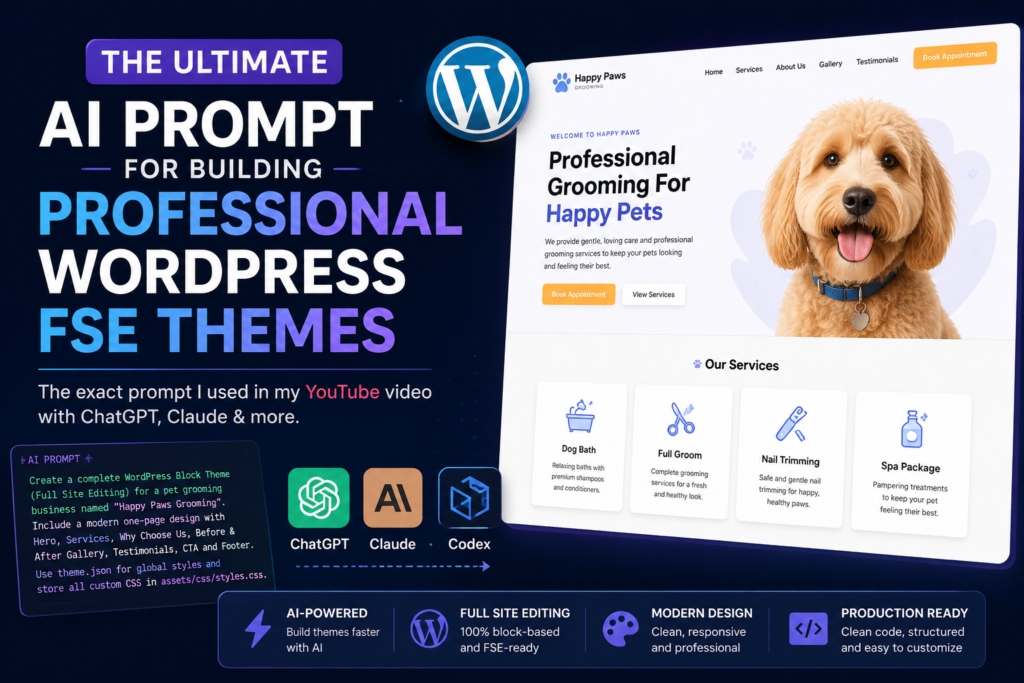
This prompt helps AI models like Claude generate a real WordPress Full Site Editing (FSE) theme, not just a collection of HTML files that look like a website.
It instructs the AI to build a production-ready theme using modern WordPress best practices, including proper theme.json configuration, reusable block patterns, clean file organization, separate CSS, valid Gutenberg block serialization, and a meaningful level of customization through the WordPress Site Editor.
The goal is to create a theme that is:
- Installable in WordPress
- Compatible with Full Site Editing
- Free of Gutenberg block validation errors
- Easy to customize through the Site Editor
- Organized using clean, maintainable code
- Built with a professional architecture instead of relying on inline styles or hardcoded layouts
While no AI prompt can guarantee perfect results every time, this prompt provides a strong foundation for generating high-quality WordPress themes. If additional refinements are needed, you can continue working with Claude, ChatGPT, Codex, or another AI coding assistant to customize the design, add features, or improve the architecture.
Tip: This prompt is designed to get you most of the way there. Think of AI as your development partner—not a one-click solution. Generate the theme, test it in WordPress, then continue refining it with AI until it matches your exact vision.
WordPress Full Site Editing Demo Theme – Pet Grooming Landing Page

Create a complete WordPress Block Theme (Full Site Editing) named Happy Paws Grooming.

This project is intended to demonstrate both modern WordPress Full Site Editing architecture and high-quality visual design.

The final result should resemble a commercially distributed premium WordPress theme rather than a simple AI-generated landing page.

The theme should be a real FSE theme, not a classic hardcoded landing page disguised as a block theme.

Goal

Build a modern, responsive one-page website for a fictional pet grooming business.

Do NOT build additional pages.

The homepage should include only:

Hero

Services

Why Choose Us

Before & After Gallery

Testimonials

Call To Action

Footer

Keep the design elegant, warm, premium, and friendly.

Technical Requirements

This must be a real WordPress Block Theme.

Use Full Site Editing.

Use this structure:

happy-paws/

style.css
theme.json
functions.php
screenshot.png

/templates
    front-page.html
    index.html

/parts
    header.html
    footer.html

/patterns
    hero.php
    services.php
    why-us.php
    gallery.php
    testimonials.php
    cta.php

/assets
    /css
        styles.css

    /images

Everything should be importable into WordPress as a normal installable theme.

CSS Rules

Very important:

Do NOT use inline CSS.

Do NOT place style="" attributes anywhere.

Do NOT generate large CSS blocks inside templates, template parts, or patterns.

Store all custom styling inside:

assets/css/styles.css

Only enqueue this stylesheet through functions.php.

Keep CSS organized with comments such as:

/* Hero */
/* Buttons */
/* Services */
/* Gallery */
/* Testimonials */
/* CTA */
/* Footer */
/* Responsive */

CSS should handle advanced presentation and responsive behavior, not basic design tokens that belong in theme.json.

FSE Customization Requirements

This theme must be meaningfully customizable through the WordPress Site Editor.

Do not make the design system CSS-dominant.

Expose appropriate design tokens through theme.json.

Users should be able to customize the following through the Site Editor wherever practical:

primary color

accent color

background color

surface/card color

heading color

body text color

muted text color

link color

button colors

font families

font sizes

line heights

content width

wide width

spacing scale

block gap

border radius

button styling

Use WordPress preset variables in assets/css/styles.css.

Example:

background: var(--wp--preset--color--primary);
color: var(--wp--preset--color--dark);

Avoid hardcoded hex colors in CSS when the value represents a user-configurable design token.

Bad:

background: #5B7CFA;
color: #202124;

Good:

background: var(--wp--preset--color--primary);
color: var(--wp--preset--color--dark);

Hardcoded colors are acceptable only for intentional decorative effects, shadows, overlays, or fixed design details that should not be user-editable.

Avoid unnecessary !important.

Only use !important when absolutely required to override WordPress core output.

Theme.json Requirements

Use theme.json properly as the design-token layer.

Define:

color palette

typography presets

font families

font sizes

line heights

spacing presets

layout widths

border radius

shadow presets where supported

global body styles

global heading styles

global paragraph styles

global link styles

global button styles

block defaults where appropriate

Use theme.json first.

Use CSS only when theme.json cannot express the design cleanly.

What Belongs In CSS

Keep the following CSS-driven:

responsive layouts

flex/grid implementation

sticky header behavior

mobile navigation behavior

pseudo-elements

hover transforms

gallery overlays

animations

decorative gradients

advanced positioning

image aspect ratios

object-fit rules

Design Style

Modern.

Premium.

Clean.

Lots of whitespace.

Rounded corners.

Soft shadows.

Large photography.

Subtle gradients.

Friendly typography.

Nothing flashy.

The business should feel trustworthy and upscale.

Color Palette

Define these in theme.json and reference them with WordPress preset variables.

Primary:

#5B7CFA

Accent:

#FFB547

Background:

#FAFAFA

Dark Text:

#202124

Muted Text:

#6B7280

Surface/Card:

#FFFFFF

Also include any additional light background or support colors as named palette values if used by the design.

Fonts

Headings:

Poppins

Body:

Inter

Configure these in theme.json.

Sections

Hero

Large headline.

Example:

Professional Grooming For Happy Pets

Supporting text.

Two buttons:

Book Appointment

View Services

Large dog image on the right.

Services

Four cards:

Dog Bath

Full Groom

Nail Trimming

Spa Package

Each card should include:

simple icon

title

short description

Why Choose Us

Three feature cards.

Examples:

Certified Groomers

Gentle Care

Convenient Scheduling

Before & After Gallery

Simple four-image responsive grid using placeholder images.

Testimonials

Three testimonial cards.

Each should include:

customer name

pet name

five stars

testimonial text

CTA

Large centered section.

Headline.

Button:

Schedule Your Visit

Footer

Include:

logo

phone

email

address

social icons

copyright

Responsiveness

Fully responsive.

Must work on:

desktop

tablet

mobile

Use modern CSS.

Avoid unnecessary wrappers.

Code Quality

Write clean production-quality code.

Use semantic HTML.

Keep markup organized.

Avoid duplicated CSS.

Keep CSS maintainable.

Use meaningful class names.

Use core Gutenberg blocks wherever possible.

WordPress Best Practices

Use block patterns wherever appropriate.

Follow WordPress coding standards.

Use proper enqueueing.

Do not hardcode unnecessary values.

Do not install plugins.

Do not use page builders.

No Bootstrap.

No Tailwind.

No jQuery.

No inline JavaScript.

No inline CSS.

Images

Use obvious placeholder image references with descriptive filenames such as:

hero-dog.jpg
before-after-1.jpg
testimonial-dog.jpg

Do not embed base64 images.

Gutenberg Serialization Requirements — Critical

This theme must be fully compatible with the WordPress Site Editor.

Do not generate HTML that merely renders correctly.

Generate valid serialized Gutenberg block markup.

Requirements:

Every block must use proper <!-- wp: --> serialization.

Every opening block comment must have the correct closing block comment.

Every block JSON object must be valid.

Never manually add attributes to rendered HTML that are not declared in the block JSON.

If a Group block renders <section id="services">, the block comment must declare "anchor":"services".

If using <section>, declare "tagName":"section".

Never manually insert id="" attributes that are not represented as block attributes.

Never insert ordinary HTML comments such as <!-- Hero Section --> inside serialized Gutenberg block trees.

Do not manually alter Gutenberg-generated markup after creating a block.

Patterns must consist of valid serialized core block markup, not arbitrary HTML that resembles blocks.

The Site Editor must open with zero "Block contains unexpected or invalid content" warnings.

Architecture Philosophy

Think like a senior WordPress theme engineer.

Do not simply create a beautiful website.

Create a commercially distributable WordPress Full Site Editing theme.

The architecture should reflect what an experienced WordPress theme developer would ship to customers.

Prioritize the following in this order:

WordPress best practices

Gutenberg compatibility

Clean architecture

Long-term maintainability

Meaningful Site Editor customization

Performance

Accessibility

Beautiful visual design

The Site Editor should own the global design system.

theme.json should define as much of the design system as WordPress supports, including:

colors

typography

spacing

layout widths

border radius

shadows where supported

button defaults

heading defaults

paragraph defaults

block defaults

styles.css should primarily handle:

responsive layouts

advanced presentation

animations

hover effects

pseudo-elements

gradients

overlays

sticky header behavior

positioning

behavior not currently supported by theme.json

Avoid creating a classic hardcoded theme wrapped in Gutenberg blocks.

Use CSS to enhance the design—not to replace the design system.

Build the theme as if it were intended for commercial distribution in the WordPress ecosystem.

Final Validation Checklist

Before completing the theme, verify:

theme.json is valid JSON.

Every PHP file parses successfully.

Every template loads correctly.

Every pattern loads correctly.

Every <!-- wp: --> block has a matching closing block comment.

Every serialized block JSON object is valid.

Every section ID is represented by a proper Gutenberg anchor attribute.

No ordinary HTML comments exist inside serialized block trees.

No style="" attributes exist anywhere.

All custom CSS is in assets/css/styles.css.

Hardcoded CSS colors are minimized.

User-configurable colors use WordPress preset variables.

Unnecessary !important declarations are avoided.

Site Editor color controls affect the appropriate areas.

Site Editor typography controls work where practical.

Button customization works where practical.

The frontend renders correctly.

The WordPress Site Editor renders correctly.

There are zero "Block contains unexpected or invalid content" warnings.

Deliverable

Generate a complete importable WordPress Block Theme that can be zipped, installed, activated, and immediately display the finished one-page website.

Prioritize:

clean architecture

maintainability

Gutenberg compatibility

meaningful Site Editor customization

WordPress best practices

polished visual design

Do not prioritize unnecessary features.

The theme is not considered complete simply because the frontend looks correct.

The project is complete only when:

the theme installs cleanly

the Site Editor opens without block validation warnings

users can meaningfully customize the design through the Site Editor

the frontend and Site Editor remain visually consistent

theme.json owns the global design system

CSS primarily handles advanced presentation

the architecture follows modern WordPress Full Site Editing best practices

the code is suitable for long-term maintenance and commercial distribution